
Build & PublishBeta
Run the real Anypoint CLI lifecycle from the browser — build, publish to Exchange, deploy, and tear down.
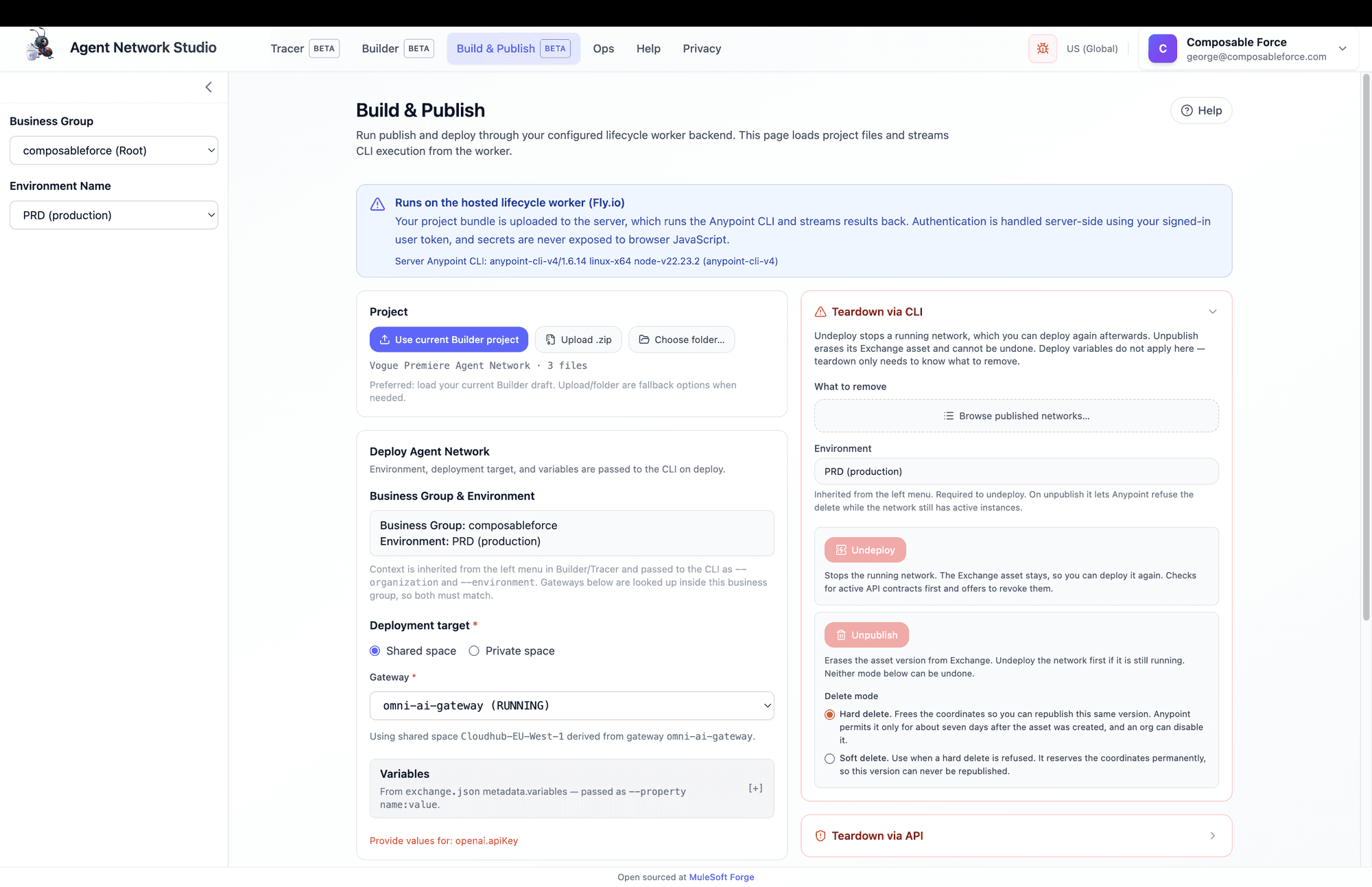
Build & Publish runs the real Anypoint CLI Agent Fabric lifecycle against your own Anypoint org — building, publishing to Exchange, deploying, and tearing down — except the CLI runs on a hosted worker, not your laptop. It's the "deploy to CloudHub" step, in the browser.
What Build & Publish does
You hand it an Agent Network project — your current Builder draft, an uploaded .zip, or a picked folder — and it runs the genuine anypoint-cli-v4 with the agent-fabric plugin. It authenticates as you (your signed-in token), so your Anypoint roles govern every outcome. Progress streams back live.
The pipeline model
The UI offers Publish, Deploy, and Publish & Deploy, plus teardown. There's no standalone Build button on purpose — publish and deploy each chain a build first, because the build artifacts they need live in a fresh workspace that's deleted after the job:
- Publish → build → publish assets to Exchange.
- Deploy → build → deploy to your environment and gateway.
- Publish & Deploy → a single deploy job that includes build and any required publish.
Publish & Deploy is one job
Jobs stream over SSE with a live log and a structured Activity view. They never retry(a failure is final until you resubmit), and logs expire after 24 hours. A Cancel button is always in reach; cancelling wins over the exit code.
Business group & environment
This is the #1 orientation gotcha
--organization and --environment, and gateways are looked up inside that business group — so both must match. Nothing enables until both are set.The org id is resolved to a name from your profile, and an id you aren't a member of is rejected outright rather than silently falling back to your root org.
Loading a project
Three load paths, in order of preference:
- 1
Use current Builder project
The primary path. Enabled when a non-empty Builder draft exists in this browser session.
- 2
Upload .zip
A fallback — a zipped project bundle. A wrapping folder is detected and stripped automatically.
- 3
Choose folder…
Chromium-only (File System Access API). Other browsers see only zip upload.
exchange.json must sit at the bundle root. A Builder project already serializes correctly; for zips/folders the wrapper is handled for you.Deployment target
The model is shared space vs private space, not a CloudHub/RTF toggle:
- Shared space — pick one gateway. The CLI derives the shared space itself at deploy time (mirroring Anypoint Code Builder). Shared spaces use the
Cloudhub-prefix in Runtime Manager. - Private space — pick a private space, plus an ingressand egress gateway. This maps to a CloudHub 2.0 private space / Runtime Fabric target.
Gateways and spaces are looked up live from Gateway Manager and Runtime Manager for the selected environment.
Variables & secrets
The Variables section is derived from your project's exchange.json metadata.variables, grouped by key prefix (e.g. openaiLlm.baseUrl → groupopenaiLlm). Each becomes a --property name:value flag. Non-secret values seed from their defaults; each group shows a complete or N missing badge.
Secrets are re-entered every session
Publish & Deploy
With a project loaded and deploy options complete, the action tiles enable. Each tile spells out its chained stages, and the blocking reason appears as a tooltip while it's disabled.
Reading the activity
- Activity view — structured steps: run start, deployment progress (Starting → Waiting → Ready), endpoints, errors, outcome.
- CLI output view — the raw stream, secrets redacted.
- Parsed summary — published assets as
assetId vX.Y.Zwith clickable Exchange links, plus any error codes.
A healthy publish or deploy finishes in a couple of minutes. Timeouts are generous (build 4m, publish 6m, deploy 5m, undeploy 15m) — hitting one usually means something is genuinely wedged, not slow.
Teardown
A separate, red-bordered card — because these actions remove things and one of them is irreversible. Targets are picker-only (chosen from live Exchange), so you can't fat-finger a GAV onto the wrong version.
- Undeploy — stops the running network; the Exchange asset survives, so you can deploy again. Requires an environment. Runs a pre-flight check for active API contracts and offers to revoke them (Anypoint refuses to remove an instance with an approved contract).
- Unpublish — erases the asset version from Exchange. Irreversible. Refuses to run (errorCode 2007) while deployed resources still reference the asset — it never undeploys for you.
- Undeploy & Unpublish — a convenience that chains the two in one job (undeploy, then unpublish with the delete mode chosen for Unpublish), for decommissioning a network entirely. Same pre-flight contract check and irreversibility confirmation as running them separately. Undeploying is per-environment, so if this network is deployed to more than one, the unpublish step can still refuse — rerun per environment.
Hard vs soft delete is asymmetric
The right order: undeploy before unpublish, and expect to revoke contracts first — or use the combined action to run them in that order automatically. Undeploying does not guarantee the follow-on unpublish succeeds: it only clears the environment you undeployed, so a network deployed to more than one still needs each undeployed before unpublish will stop refusing.
Reading a failure
When a job fails, a diagnosis dialog pops up: a plain-language explanation, error-code chips, and a numbered "How to fix" list. On a failed deploy, Build & Publish also automatically fetches the deployment's Runtime Manager logs and shows them inline — because a deploy rarely hangs at random; the app was usually created but never went healthy.
Gotchas
- There is no Build button — Publish and Deploy each chain a build.
- Business group and environment live in the left sidebar, not the form.
- The deployment target locks after the first successful deploy. Changing gateway/space later throws a wall of 3025 errors whose real cause is a single 400 — delete the deployment in Runtime Manager first. See the fix.
- A deploy timeout rarely means "retry" — read the auto-fetched RM log.
- Brokers must reach their connections at deploy time — deploy the MCP server (or other endpoint) first, on the same gateway/space.
- Secret variables reset every session; jobs never retry; logs expire after 24h.
- "Choose folder…" is Chromium-only.
- Ignore the setup landing copy if you ever see it — when the worker is enabled, your bundle is uploaded to the hosted worker (over your authenticated session); the marketing landing page says otherwise and is stale.