
BuilderBeta
Visually author an Agent Network 2.0 project — wire Exchange assets, draw the broker graph, export the bundle.
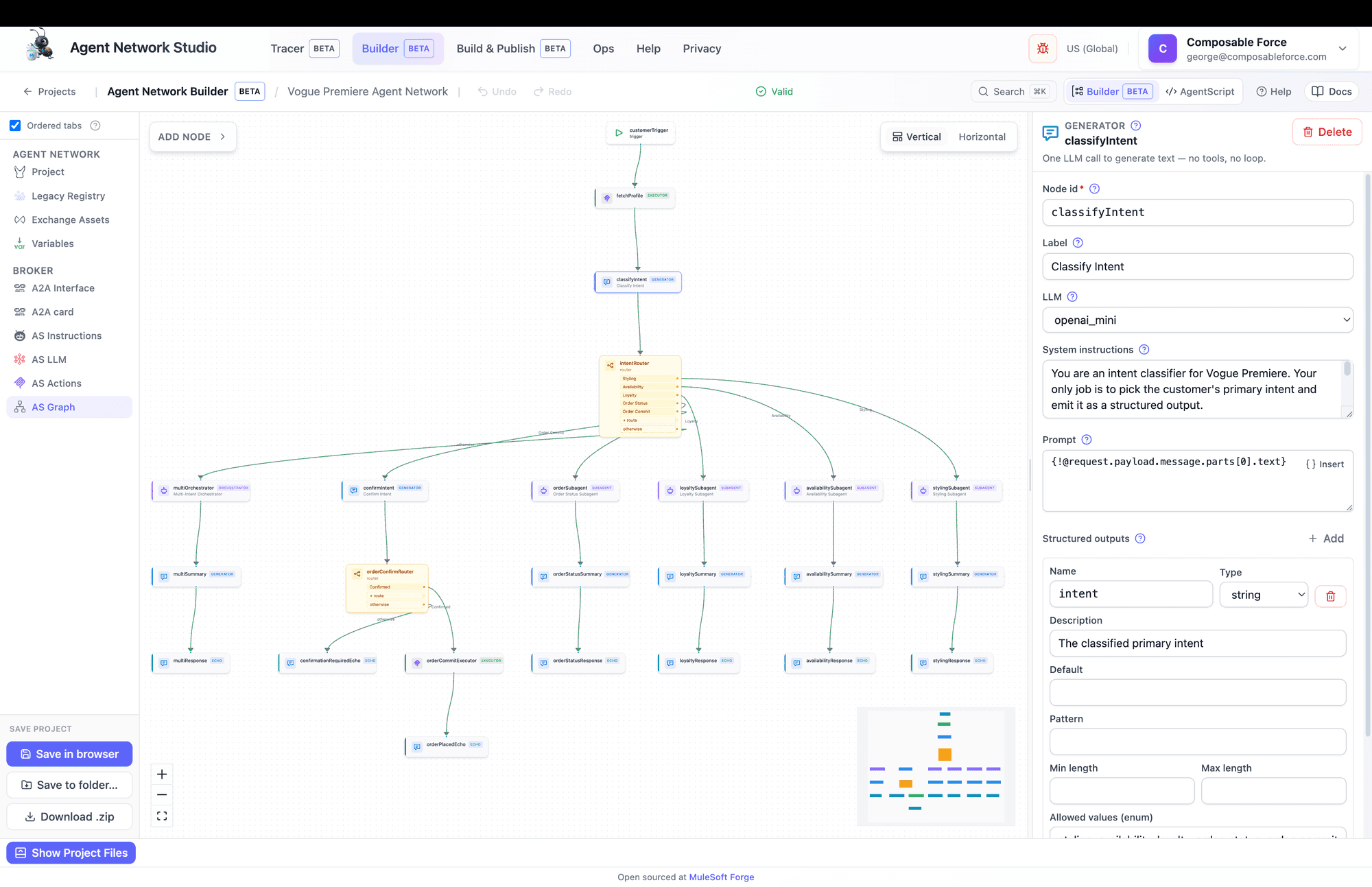
Builder is where you author an Agent Network — visually, on a canvas, the way you'd build a flow in Studio. It edits one project made of three files, and it never publishes anything: you compose existing Exchange assets and export a bundle. (In the code it's called "Composer".)
What Builder does
You build one broker: an LLM-driven agent, reachable over A2A, that receives a message and runs a node graph — calling LLMs, MCP tools, and other agents before answering. The output is a local project bundle; Build & Publish takes it from there.
Compose, never create
Starting a project
First, pick a business group in the sidebar — nothing is available until you do. Then choose one of four starting points:
- Open from Exchange — import a published agent-network asset and version.
- Open local project — a project folder or a
.zip. - Start blank — an empty identity, a broker shell, and zero graph nodes.
- Open prebuilt template — the Vogue Premiere Style Concierge (recommended for a first run).
Learn from the example first
One model, three files
Everything you edit lives in a single in-memory project. The three files are one-way projections of it:
exchange.json— the Exchange descriptor: identity, dependencies, deploy variables.agent-network.yaml— the network: registry, connections, and the broker's A2A card.brokers/<key>.agent— the AgentScript graph (the executable part).
This is why a single rename fans out everywhere. Add an Exchange asset and Builder auto-creates the dependency, the connection, the deploy variables, and — for MCP servers — one action per tool. Delete it and all of that (plus references in graph nodes) is stripped back out. Don't hand-maintain derivations; edit the source and let them recompute.
The four-hop chain worth memorizing
@actions.x) or LLM binding (@llm.x) → a graph node that references it. That's how a published tool becomes something a node can call.The guided build order
Builder ships an opinionated order and can gently enforce it (the Ordered tabs toggle; a methodology modal explains it on first entry). Tabs lock with a padlock until their prerequisite is met. The order:
- 1
Project (identity)
Name, org, a valid Exchange asset id, version, version group. Org and descriptor version are one-way once set.
- 2
Inventory (Exchange Assets)
Compose at least one asset — an LLM, MCP server, or agent. This is where most of the auto-wiring happens.
- 3
Variables
Review derived deploy variables; add custom ones for any
${group.field}markers you typed into prompts. - 4
A2A Interface then A2A card
Set inbound/outbound policies first — they generate the card's security — then fill the card (name, version, description, endpoint URL).
- 5
Instructions → LLM → Actions
The broker persona, the LLM bindings, and the actions each node may call. Asset import usually pre-satisfies actions.
- 6
Graph
Where the real work happens — see below.
Gating can switch itself off
Composing Exchange assets
"Compose from Exchange" opens the asset picker, filtered by kind (Agents / MCP Servers / LLMs / Policies) and scope (your business group / MuleSoft-supplied). Adding an asset auto-wires downstream objects — the mechanic to internalize:
- LLM → an LLM binding (and becomes the broker default if none exists yet).
- MCP server → one action per advertised tool (metadata fetched at pick time).
- Agent → one
a2a:send_messageaction.
Renaming an asset's connection re-points every action and binding that used it. Removing an asset drops its actions/bindings and strips dangling references from graph nodes.
The seven node kinds
A crucial naming trap: MCP, A2A, and LLM are not node types. They reach the graph indirectly, as actions and bindings. The nodes on the canvas are these seven kinds:
trigger
Entry point — starts the graph when a message arrives.
Requires: An on-message transition. Exactly one per interface; can't be deleted.
generator
One LLM call to generate text — no tools, no loop.
Requires: A prompt.
orchestrator
Coordinates multiple agents & MCP tools to reach a goal.
Requires: Reasoning instructions (loop default 25).
subagent
Generic agent loop with a prompt and a set of actions.
Requires: Reasoning instructions.
executor
Deterministic steps — set variables and run actions. No LLM.
Requires: A non-empty do: block.
router
Deterministic branching on conditions — no LLM.
Requires: At least one route + an otherwise target.
echo
Sends a response back to the client.
Requires: A kind; status echoes need a state + message, artifact echoes need an artifact.
Orchestrator vs subagent share a shape — orchestrator is a subagent specialized for coordinating multiple agents. Generator/orchestrator/subagent reason with an LLM; executor/router are deterministic (executors even forbid slot-filling, since there's no LLM to resolve arguments).
Structured outputs unlock clean routing
outputs and a router can branch on@node.output.field instead of parsing prose. The in-canvas coach nags about exactly this.Building the graph
The AS Graph tab is a React Flow canvas. Several ways to add nodes:
- Palette (top-left) — pick a kind to drop a node.
- Drag-to-create — drag a connection onto empty canvas and pick a kind; it's created and wired.
- Insert-on-edge — the
+on any edge splices a node intosource → new → target. - "What next?" — the coach on each node suggests and wires a sensible successor.
Rules the canvas enforces
- Nothing can transition into the trigger; it's the entry point.
- Echo is terminal-ish — it accepts inbound edges only (no source handle). A status echo in Completed/Failed/Canceled/Rejected ends a path; other states must transition onward.
- Every reachable path must reach a terminal echo, or you get a blocking error.
- Incompatible connections show a red "Schema mismatch" ping and a reason toast.
- Layout controls (Vertical / Horizontal) reflow the graph; the model owns positions, so adding nodes never disturbs a hand-arranged layout.
Shortcuts: ⌘K command palette, ⌘F canvas search, ⌘Z / ⇧⌘Zundo/redo. A Builder / AgentScript toggle (top bar, on the graph tab) reveals the raw.agent source with a live official-graph render.
Validation & the coach
A validation strip at the top shows a green "Valid" chip or "N blocking · N warnings". Every issue is clickable — it opens the right tab and focuses the offending field. Each graph node also carries the ANT Coach: "Node tips" lists Required / Recommended / Optional advice, and "What next?" suggests successors.
Validation runs in layers, and you meet them in this order:
- Structural — the project shape itself.
- Consistency — the graph rules (triggers, echoes, routes, actions, LLMs).
- Official schema — the Agent Network v2 JSON Schema.
- A2A card completeness — required and recommended card fields.
- AgentScript conformance — the official AgentFabric linter over the exact bytes.
allowed list) are intentionally non-blocking — advice, not errors.Saving & exporting
Three options at the bottom of the left nav:
- Save in browser — a localStorage library keyed by GAV, 25 entries max. No validation gate, so you can park an incomplete project.
- Save to folder… — writes real files. Chromium only (Chrome/Edge).
- Download .zip — the bundle as
<assetId>.zip.
No export is validation-gated
Gotchas
- Deleting an asset silently rewrites the graph — its actions, bindings, and every node reference to them are removed.
- The trigger can't be deleted, and there's only ever one.
- Org id and descriptor version are one-way — to change org, go back to the landing page.
- Card security can't be hand-edited — it's derived from your A2A Interface policies only.
- An edit can re-lock the tab you're on — e.g. clearing the project name kicks you back to the Project stage.
- Editing files or AgentScript while the model changed underneath blocks Apply until you reset. Semantic warnings need a second "Apply with migrations" click.
- v1 projects are rejected on import, and multiple ambiguous
.agentfiles throw. - "Save in browser" doesn't validate, and it overwrites in place at the same GAV.
Node and field references live in MuleSoft's AgentScript reference.